
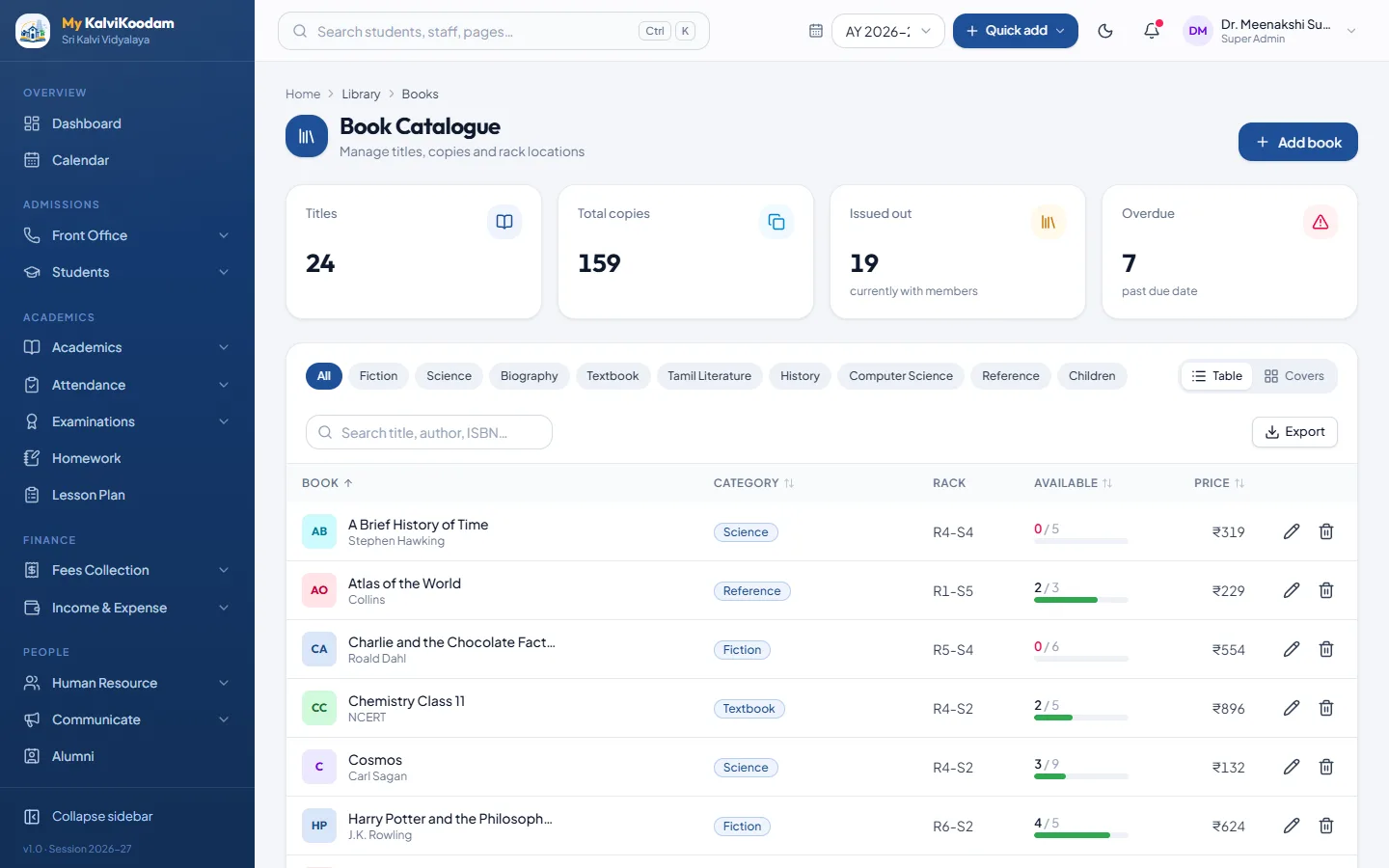
A catalogue the librarian can search
Every title goes into the catalogue with its author, ISBN, category, publisher, rack and price. The rack is there for a reason: when a student asks for a book, the librarian can look it up and say which shelf it is on. The price helps when a lost book has to be replaced or recovered.
In My KalviKoodam the catalogue also keeps count of copies. You record how many copies the library owns, and the system works out how many are on the shelf.
Setting up the catalogue is the biggest one-off job. Schools commonly start with the books already on the shelves and add new purchases as they arrive. A practical approach is to catalogue one rack at a time, so the physical shelf and the record can be checked against each other as you go.
Details such as the rack and the price pay back. A rack number cuts the time spent looking for a book on the shelf, and the price lets the school decide quickly what to ask of a family who has lost a book. The category helps when someone asks for books on a subject.
Copies available, worked out for you
Nobody should have to subtract books on a slip of paper. Copies owned minus copies out gives copies available, and the figure changes by itself when a book goes out or comes back. A title with no copy left cannot be issued, so the record always matches what is physically on the shelf.
An example: the library owns four copies of a popular title and three are out on loan. The record shows one copy available. When the fourth is issued, the title shows none available and the system will not issue a fifth. This also protects the librarian from a common argument, when a child insists a book was on the shelf and the register says it was not.
Members: students and staff
Students and staff are enrolled as library members and given a library card number. Because the library uses the same student and staff records as the rest of the school, there is no second list of names to type and keep updated. Any student or staff member can be enrolled, and the students module remains the single source of names and classes.
One advantage of using the school's own records is that membership stays correct as pupils join and leave. Nobody has to maintain a separate library list of names, and the card number is the only extra thing the library adds. Teachers and other staff can be members too.
When a member leaves the school, the usual routine applies: check the overdue list and the member's loan history before handing over a transfer certificate. The loan history shows at a glance whether a book is still out.
Issue and return with a due date
Issuing a book means choosing the member and the title and setting a due date. Returning it closes the loan. The loan history is kept for each book and for each member, so the librarian can answer two common questions in seconds: who has this book, and what has this child borrowed this year.
Think of what the librarian is asked. A class teacher wants to know whether a student has had a book for three weeks. A parent says the book was returned. A child cannot remember whether they borrowed a title. The loan history answers each of these from the record, with the dates, and the librarian does not have to search through register pages.
A due date at the time of issue also sets a rhythm. When the library uses a standard loan period, students learn it, and the overdue list becomes predictable: it fills the day after the due date and clears as books come back.
- Issue with a due date
- Return recorded on the same screen
- Loan history for each book and each member
- No issue when no copy is left
Overdue books and late fines
The overdue list shows every book that is late, how many days late it is and the fine so far. The late fine is counted per day and worked out when the book is returned, so the figure the librarian quotes is the one in the system. The librarian dashboard also shows books on loan and what is due back today, which makes a good start to the morning.
Fines are counted per day and worked out at the point of return, so the librarian does not need a calculator or a rate card at the desk. The librarian dashboard acts as a daily to-do list: what is on loan, what is overdue and what comes back today. Starting the day with that list tells the librarian exactly whom to remind.
A fine works as a deterrent only if it is applied consistently. Because the system counts it per day and works it out when the book is returned, every member is treated the same way, and the librarian is not asked to make a judgment on the spot.
Reports the school office can use
Two ready reports serve the library: Overdue books and Book stock. They can be exported to CSV and opened in Excel for the annual stock check or a meeting with the management. They appear when the school has the library module, and each person sees the reports their role can open. See the reports module for the full list.
Book stock is useful once a year. At the annual stock check the librarian can export the report to CSV, print it and walk the shelves against it. Differences show up as a short list to investigate instead of a whole catalogue to recount.
The stock report also helps when a new term begins and the library decides what to buy: the catalogue shows how many copies of each title the school already owns.
Questions the library answers in seconds
A good library record saves most of its time on small questions asked many times a day. These are the ones the system answers straight away.
- Is this book in? Copies available shows it
- Who has it? The loan history of the book shows it
- What is overdue today? The overdue list shows it, with days late and the fine so far
- What has this student borrowed? The member's loan history shows it
- How many copies of this title do we own? The catalogue shows it
Who uses it
The librarian is the main user, with their own home screen. Teachers, the principal and the vice principal can also open it. A teacher who wants to check what a student has borrowed does not need to ask in person.
Teachers have access because the library supports classroom work. A teacher can look up what a student has borrowed without asking the librarian, and the principal and vice principal can review the overdue list when the management asks about the library.
A routine for the first month
If you are starting from a paper register, a few steps get the library working quickly. Catalogue a rack, enrol the members who borrow most, and begin issuing from the system on a fixed day. Keep the paper register for a short overlap, then retire it once the loan list in the system matches the books that are out.
The aim is a clean break. A library with two records is a library with two sets of arguments, so choose a start date, tell the students and staff, and issue everything through the system from that day.
- Catalogue the books rack by rack, with copies owned
- Enrol students and staff with library card numbers
- Fix a start date and issue through the system from that day
- Check the overdue list weekly and remind the members concerned
- Export the Book stock report for the annual check
Part of a wider campus system
The library is one of several campus modules in the system, alongside inventory, transport and hostel. If your school wants to compare, read the library, transport and hostel overview. When you are ready to see the library screens with sample books, book a demo.
A school library is part of the school's culture, and the record supports that. Teachers can see what their students read, the principal can see how much the library is used, and the librarian can spend time helping children find books instead of keeping a register.