
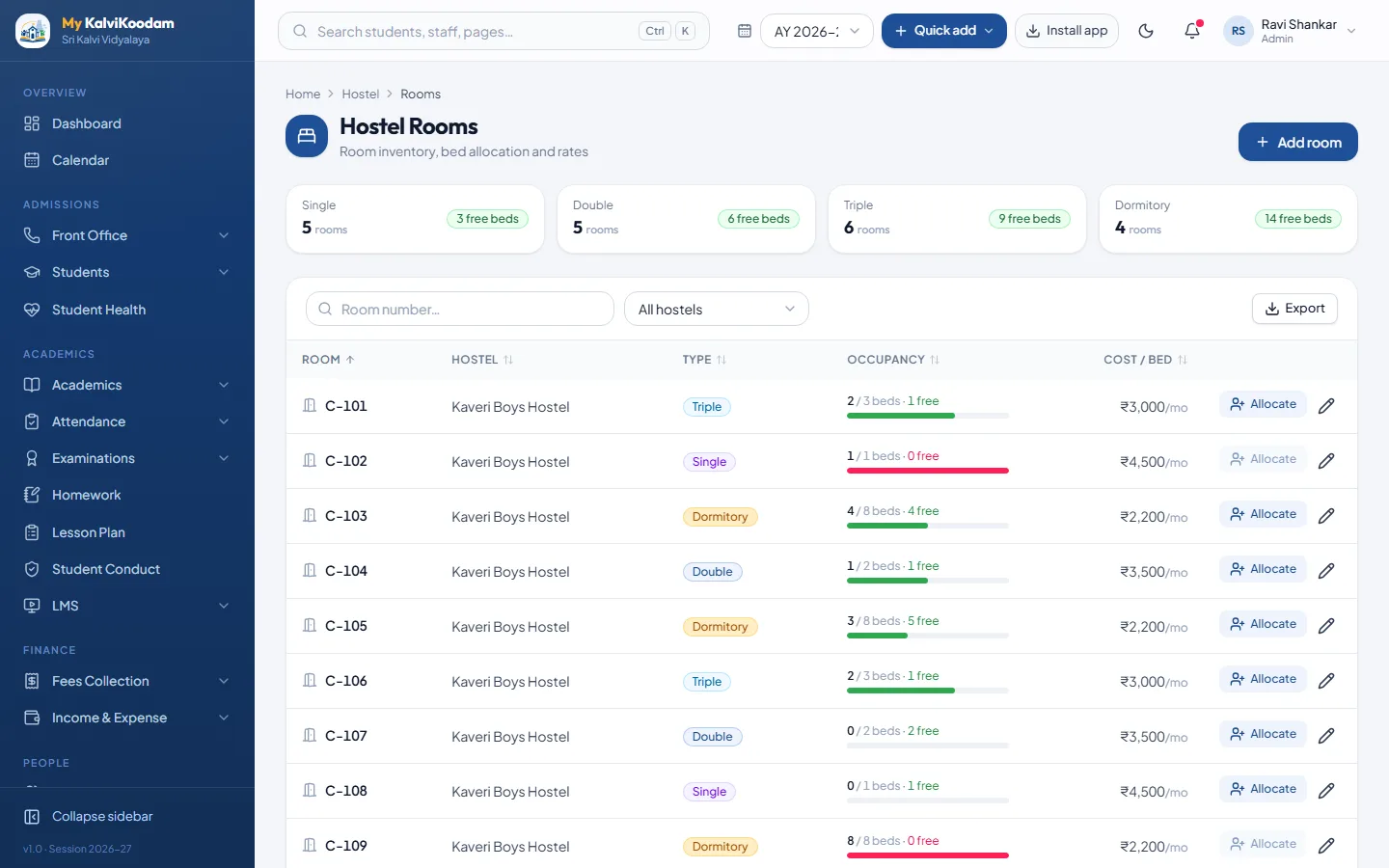
Set up each hostel once
A boarding school or a school with a boys' or girls' hostel can record each building in My KalviKoodam. A hostel is set up as a Boys or Girls hostel with its warden, its address and its intake. After that, everything else hangs from the hostel: the rooms, the beds and the residents.
The record is deliberately simple, because a hostel office is usually one warden and a register. Entering the hostel once, with its intake, gives the school a clear ceiling to plan against. When the intake is full, the bed count on the hostel screen tells you so before an admission is promised to a family.
Rooms, beds and the cost per bed
Rooms are recorded by type, such as Single, Double, Triple or Dormitory, with the number of beds and the cost per bed. Because the charge is held against the bed, the monthly bill for a boarder comes straight from where they sleep.
Cost per bed gives the school freedom to price different rooms differently. A dormitory bed and a single room do not have to cost the same, and each resident is billed from the bed they hold. That keeps the monthly bill simple to explain to a parent: it is the cost of the room, listed in the fee ledger.
Review beds and costs at the start of each year. If the fee for a room changes, update the cost per bed before the next billing run so the new amount is used.
- Room types Single, Double, Triple and Dormitory
- Number of beds per room
- Cost per bed, used for monthly billing
Allocating a student to a bed
Allocation is done from the hostel screen: choose the student and the bed. The system accepts a student only into a hostel of the same gender, which prevents a wrong entry at the desk. When a boarder leaves or changes room, you vacate the bed and the room count updates.
Hostel can also be chosen on the New Admission form, and it then shows on the student profile alongside class, fees and attendance.
In practice the gender rule saves an embarrassing error at admission time, when the office is busy and a form is half filled. The system will not accept the wrong placement, so the receptionist does not need to double check against a printed list. Changing rooms is simply a matter of vacating one bed and allocating another.
The gender rule also helps when two staff members share the admission desk and one covers for the other. The rule is in the system, not in anyone's memory, so it applies the same way every time.
See free and occupied beds at a glance
For each hostel and each room the screen shows which beds are occupied and which are free. The warden and the office do not need to count against a register when a new family asks about a seat in the hostel. A residents list for each hostel shows every boarder with class and room, which is handy for roll calls and for the warden's own file.
The view is useful at three moments. Before the year starts, the management can see how many seats are left to offer. During the year, the warden can find a bed quickly for a mid-term joiner. At year end, the vacated beds show the capacity ready for the next intake.
Monthly hostel fees in the same ledger
The hostel module does not keep its own cash book. A monthly billing run creates a room charge for every resident, and each charge lands in that pupil's fee ledger with tuition and other fees. The accountant collects it at the same counter, the receipt is the same receipt, and reminders cover it too.
Because hostel dues sit in the same ledger, they carry forward as previous dues when a class is promoted, like any other unpaid fee. For the counter side, see fee management and the fees module.
For the accountant this removes a whole register. Without the link, the warden keeps a list of boarders and the accountant builds a bill from it, with the usual risk of a missing name. With the link, the list the warden sees and the list the accountant bills are the same list. The hostel run is also a monthly job, so it takes minutes, not a day of calculation.
The monthly run is a good habit to fix on the calendar. Doing it on the same day each month means the hostel charge appears in the ledger before the due date, parents can see it in the portal, and automatic fee reminders, if switched on, include it.
Looking after boarders' health and families
Boarders are away from home, so health information matters more. The health module holds blood group, allergies, medicines kept at school, emergency contact and treatment consent, and the sick room logs each visit. Parents are told in the portal when a child is sent home or referred to hospital.
The messaging screen also has a smart list of hostel residents, so a notice about visiting day reaches the boarders' families and nobody else.
When a boarder falls ill, the sick room log records the complaint, temperature, treatment, medicine given and outcome, and parents are told in the portal if the child is sent home or referred. Staff see severe allergies and medicines kept at school in one box on the student health record, instead of in a loose file.
Parents of boarders have the same family login as other parents, where they see fees due, results and notices, so the hostel does not have to pass these on separately.
A year in the hostel office
At the start of the year, set up or confirm each hostel and its rooms, then allocate the returning boarders and the new admissions. Through the year, allocate and vacate as children join and leave, and run the monthly billing so the charge reaches the fee ledger on time.
At the end of the year, vacate the beds of those who are leaving so the hostel shows them as free for the next batch. Any hostel dues that remain sit in the fee ledger like other unpaid fees, and carry forward as previous dues when a class is promoted.
- Before the year: confirm hostels, rooms, beds and the cost per bed
- At admission: choose the hostel and allocate a bed
- Every month: run the hostel billing
- At the end: vacate beds and review the residents list
The mess: menu, meals and mess fees
The mess is part of the hostel module. Each hostel has a weekly menu for breakfast, lunch, snacks and dinner, with a veg, non-veg or egg mark on every item. A school can switch meals on or off per hostel, rename them, run a week 1 and week 2 rotation and set a special menu for a festival day. The weekly menu prints on A4, and parents see it in the portal.
The warden marks which residents ate each meal, with quick actions such as everyone present, and sets a resident away for a range of dates. The kitchen headcount shows, for each meal, how many are expected, how many ate and the split by diet, with flags such as "Allergy: peanuts: 3 residents". A monthly sheet per resident exports to CSV.
Each resident can have a diet preference, a meal plan and an allergy or medical note. Allergy notes are private to hostel staff and administrators; teachers and parents of other children never see them. A resident's health profile is linked, not copied.
Mess charges are set per hostel: a flat monthly amount by meal plan, with a credit when a resident has been away for several continuous days, or a rate per meal that counts only the meals the warden recorded. A preview comes first, and the monthly run posts the charge to the fee ledger as its own Hostel Mess fee head, so reports can tell room fees from mess fees. Running a month again never bills twice. The parent portal shows the week's menu, the child's meals this month and the charges.
- Meals are entered by the warden: there is no biometric or RFID meal counting
- Kitchen stock and grocery buying are not in the hostel module; the inventory module covers stores
- A separate hostel visitor register is not part of the module
Questions families ask about the hostel
A hostel office hears the same questions from families every year. Having the answers on one screen makes the conversation short and accurate.
- Is there a bed free? The hostel and room screens show free and occupied beds
- Which room is my child in? The residents list and the student profile show it
- What does it cost? The cost per bed and the monthly charge in the fee ledger show it
- What if my child is unwell? The sick room log records the visit, and the portal tells parents if the child is sent home
Who uses it
The receptionist, principal, vice principal, correspondent and managing director can open the hostel module. It belongs with the other campus modules, described on the library, transport and hostel page, and works next to transport. To see it on sample data, book a demo.
Used together, the modules give a boarding school a clear weekly routine. The warden keeps the bed allocation up to date, the accountant runs the monthly billing and the principal looks at the residents list when a parent asks about a child's room.
Each of these roles sees the hostel module because each has a reason to. The receptionist handles admissions and first enquiries, the principal and vice principal need to know who lives where, and the correspondent and managing director look at occupancy and income. Parents do not see the module, but they see the resulting charge among their fees.