
What a student information system should hold
A student information system, often called an SIS, is the record of every child in the school. Done well, it is the base on which everything else rests. Attendance, fees, marks, certificates and parent logins all need to know who the pupil is, which class they are in and who their guardians are.
In My KalviKoodam this is the students module. It is meant to be the first module a school sets up, because the other modules build on it.
The simplest test of an SIS is the first day of the year. If every class list, fee list and attendance register is right without anyone retyping names, the student record is doing its job. If staff are still copying names between books, it is not.
Because other modules read from the record, its quality is everyone's concern. A wrong section on a profile means a child missing from the attendance list and from the class list for marks. A little time at the start checking classes, sections and guardian phone numbers is the cheapest way to avoid problems later.
A directory you can search and filter
The student directory opens in table view or card view. You can search by name and narrow by class and section, which helps the office find a child while a parent is still on the phone. The list can be exported to CSV and printed, and a Class-wise strength report shows boys and girls for each section.
The two views suit two jobs. Table view is for scanning and filtering, such as every pupil in one section, while card view is friendlier when you want to recognise a child by photo. Filters combine with the search box, so finding the right child among several with a common name is quick, and a command palette on Ctrl+K helps staff move around from the keyboard.
Admission straight into a profile
The New Admission form takes the student, the parents, the class, the house, and the transport and hostel choices in one go. When a family applies through the school's public online form, the office can move the application to admission and the form opens already filled in. See front office and the admission page.
A photo and documents can be added to each record as PDF or image files.
Admission is also where the first dues begin. The class, house, transport and hostel chosen on the form flow to the other modules, so the route chosen is what transport bills and the hostel chosen is what the hostel module allocates. A welcome message to the family can go out automatically when a pupil is admitted.
A school that has used enquiries and online applications has already collected much of the data. The office confirms the details, adds documents, and the new profile starts almost complete. A school that has not can still use the New Admission form directly at the front desk.
One profile with the whole picture
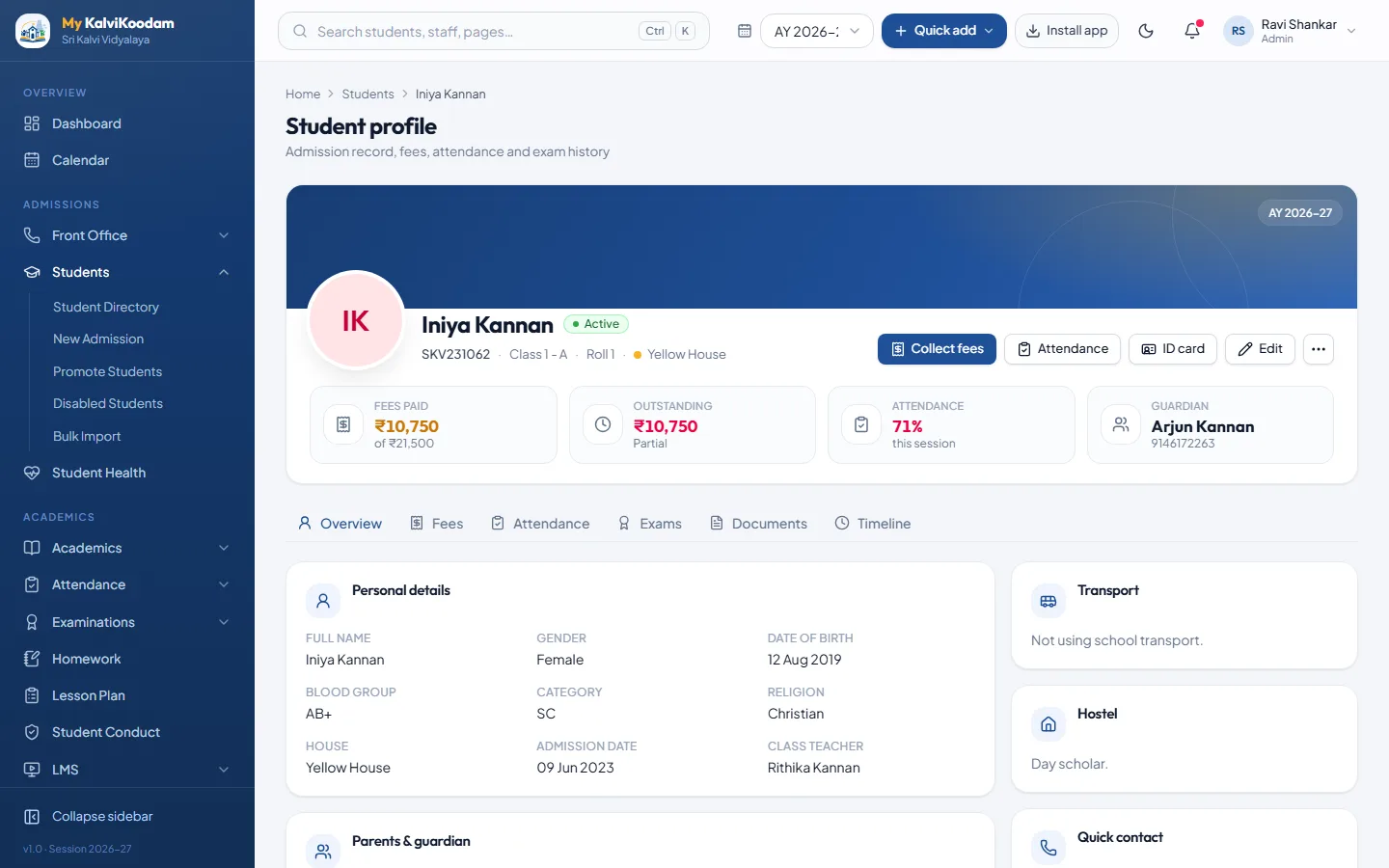
Open a profile and you see fees, attendance, exam results, documents and a timeline in one place. The profile is where a class teacher checks a child's attendance before a parent meeting, where the accountant looks at dues, and where the principal reads a concern. A profile can be printed for the file.
The timeline gives the profile a memory. A class teacher taking over a section in mid-year can open a child's profile and see what has happened, without hunting through files. Documents uploaded to the profile, such as certificate copies, stay with the record and do not live in a drawer.
Printing a profile is handy when a parent meeting needs a one-page summary or when a file has to be handed over.
- Guardians and contact details
- Fees, with dues and past receipts
- Attendance and exam results
- Photo and uploaded documents
- A timeline of what has happened
Health and conduct sit in the record
The health module keeps blood group, allergies, conditions, medicines and vaccinations, with a box that shows severe allergies and medicines kept at school, so staff see them before acting. The conduct module records concerns, recognition and confidential counselling notes. Counselling notes are readable only by school leaders, and a record is shared with parents only when the school chooses.
Because these records sit with the student, a teacher who needs to know about a child's allergy does not have to ring the office. Conduct is handled with care: teachers see their own records and the non-confidential records of their class, and school leaders are alerted when a concern of High severity is recorded. Parents can acknowledge a concern with a comment when the school shares it.
Promotion at the end of the year
At year end you promote students class to class. Pupils can be held back, or marked as left. The fees a pupil has not paid are carried forward as previous dues, so the new year starts with the right balance. A whole class is promoted in one step rather than child by child.
A graduated batch can be marked as alumni, which hands over to the alumni module.
Think about the day after the results. Without a promotion tool, the office retypes each child into the new class and then moves unpaid fees by hand. Here the class moves up in one step, the exceptions are marked and the accountant opens the new year with the dues intact. The fee structure for the new year can also be copied forward from the previous one.
Getting your existing students in
Moving from an old system should not mean retyping every child. Bulk Import reads a CSV file, lets you match its columns to the fields in the system and checks the data row by row, so mistakes are found before they are saved. A school can therefore start on the first day with real records, and we help with the first setup.
An import is only as good as the file you give it, so the row-by-row check is a kindness. A row with a problem is shown against that row and can be corrected in the file before anything is saved. After the first import, the same screen is useful whenever a large batch of new admissions arrives.
Importing is also a good moment to clean the data. Check the spelling of names, the class names and the guardian's phone number. These fields are used everywhere: the phone number is the parent's sign-in and the number that absence lists show.
Logins for parents and students, and for the day they leave
From the directory you can create parent and student portal logins one by one or for a whole class. A family with several children has one login. When a pupil leaves, their login stops working straight away. A Disabled Students list shows the reason and lets you re-enable a child with one click.
A common first-week task is to create logins for a whole class and send the details home. A parent signs in with the registered phone number and must change the password on first use, so the accuracy of the phone number on the profile is worth checking at import time. See the parent portal for what families see.
A pupil's record across a school career
The value of a single record is clearest when you follow one child through the years. The same profile is opened at every stage, and each department adds what it knows.
- Enquiry and online application, then admission into the profile
- Each year, promotion to the next class, with unpaid fees carried forward
- Daily attendance, leave applications and monthly percentages
- Health profile, checkups and sick-room visits
- Exam results, marksheets and term report cards
- Conduct records, recognition and counselling notes where needed
- Transfer certificate when the pupil leaves, or alumni registration after graduation
Who sees what
The principal, vice principal, receptionist, teacher and accountant all use the student module, each through their own role. Parents see only their own child. To see a full sample profile, book a demo.
Role access is not cosmetic. Teachers see the students of their own classes and sections, and not the fee details. The receptionist works with admissions and the directory, the accountant with fees and dues, and the principal with the whole record. Report cards and certificates draw on the same profile.
The directory is also where the principal or vice principal begins when a parent phones about a child: search, open the profile and everything is there. The receptionist can often answer without transferring the call.