
From the exam hall to the report card
Report cards are the one piece of paper every parent reads closely, so they are also the one most often corrected at the last minute. The usual causes are a mark typed into two books, a rank worked out by hand and a remark that went missing. My KalviKoodam keeps the whole chain in one place: the exam is set up, the marks are entered once, the results are worked out, and the marksheet or report card prints from those results.
Seen from the parent's side, the report card is the most important message the school sends all term. It should be accurate, readable and on time, and the system is arranged so those three things come from one place: marks entered by the subject teachers, results worked out once, and a printed sheet that follows the result exactly.
Set up the exams and papers
Exams sit inside exam groups, and a group can be one of three kinds: General Purpose, Grade System or Average Passing. For each class you then record an exam schedule with the date, time, room, maximum marks and pass marks. The same schedule prints on the admit card, so the hall ticket and the timetable on the notice board never disagree.
The exams module is built on the classes, sections and subjects in academics, which is why nothing is typed twice.
Setting maximum and pass marks when you schedule the exam has a second benefit. Pass or fail in the results comes from the numbers entered here, not from a rule that somebody remembers. Pick the exam group type that fits how your school treats that set of exams and keep the set-up consistent from one term to the next.
Marks entry by class, section and subject
A teacher opens a class, a section and a subject and enters the marks for the whole list. Students who did not sit the paper can be marked absent, and marks can also be brought in from a CSV file when they arrive from a spreadsheet. A school that prefers to collect marks on paper first can type them in later in one sitting.
Entering marks for the whole class on one screen is quicker than passing mark lists between teachers, and it removes the step of copying marks from sheets into a register. Blanks are easy to see in a class list, so the exam office knows who is missing marks before results are worked out. Absent marking records that a child did not sit the paper, which is different from a low score.
When several teachers are entering marks at once, the exam coordinator can open the class results and see which subjects are still blank, which makes it easy to chase the one teacher whose marks are outstanding.
Papers made of parts
Many schools split a paper into components. A subject may have a theory part and a practical part, or a term may combine summative and formative assessments. You can give a paper optional parts and the system rolls them into one total, so the marksheet shows the parts and the final figure.
This is set up by the school, not by a fixed board pattern, so you decide which parts a paper has and what each is out of.
Setting up parts means thinking once about the structure of each subject. For a subject with theory and practical, record the parts, enter marks for each and the total is added for you. Teachers enter what they marked, and the arithmetic is not left to a calculator at midnight. The marksheet then shows how each part contributed.
Results with grades, ranks and pass or fail
Once marks are in, results show the total, percentage, grade, rank and a pass or fail for each student. Grades follow the school's own grade scale, which you can change. The results can be exported to CSV, and a class toppers report picks the top students from the latest published exam.
A rank can be sensitive in some schools and expected in others. The system works it out so it is available, and the school chooses how it appears through its marksheet layout. Percentage and grade sit beside it, so a child who is fifth in the class with a very high percentage is not misread. The class-wise performance analysis shows how each class did.
- Total, percentage, grade and rank for every student
- A configurable grade scale that you set
- Pass or fail from the pass marks you entered
- CSV export for analysis in a spreadsheet
Marksheets in a standard or detailed layout
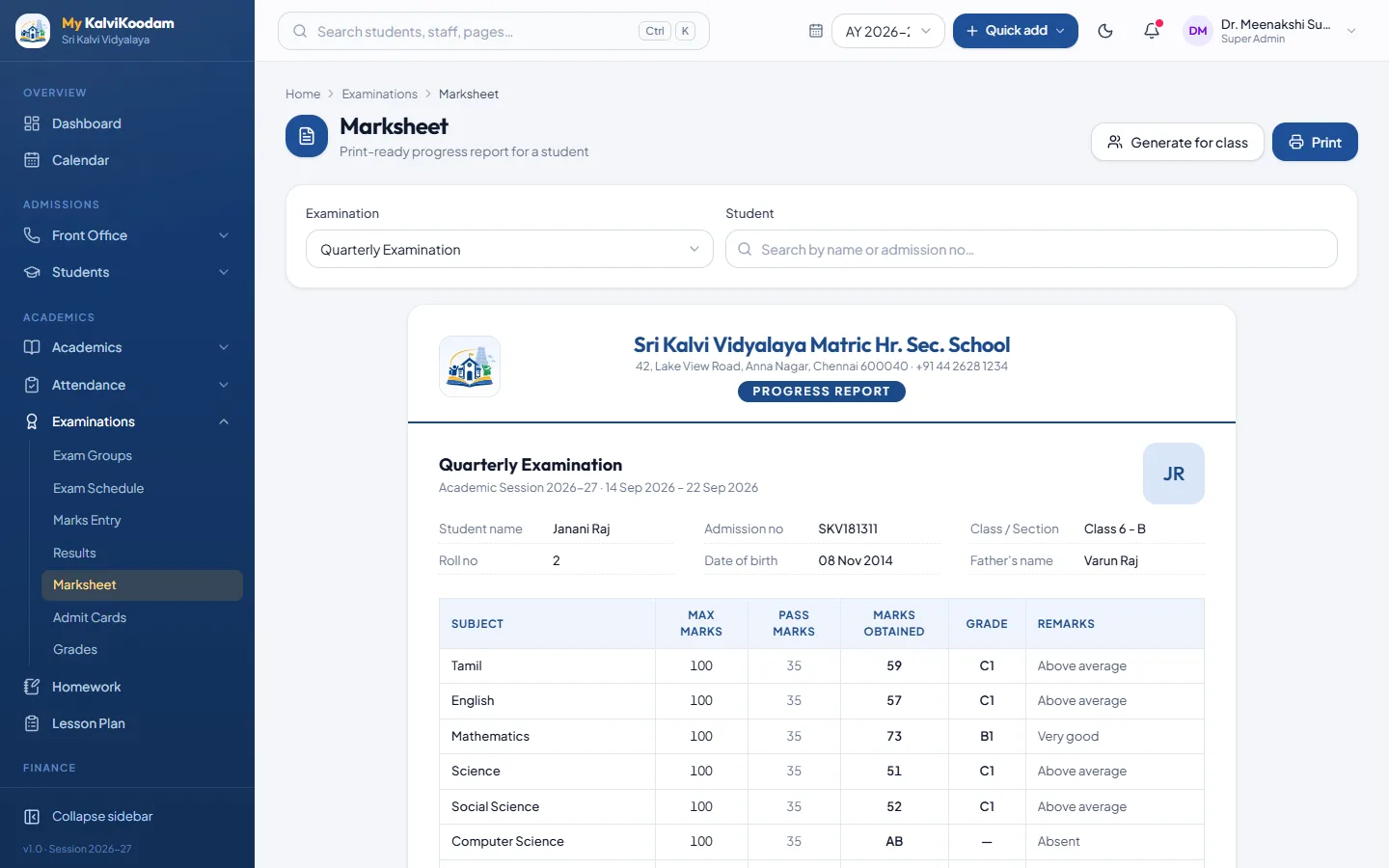
The marksheet is a print-ready progress report, available in a standard layout or a more detailed one. It prints cleanly on plain A4. Student photos can appear on it, and the latest height and weight from the health module and attendance days can print on the report card, so the sheet carries more than marks.
The detailed layout suits terms when parents want more figures, and the standard layout is a clean summary. Either way the sheet is plain A4, so the school does not need special stationery. Attendance and the latest height and weight come from records already in the system, so the class teacher does not collect and type them again at report card time.
The marksheet designer
Not every school wants the standard layout. Marksheet Design lets you set your own header, choose the columns, define the pass rules and build combined exam sheets that bring several exams onto one page. A school that sends a single annual sheet can combine its terms. A school that wants a different header can make it its own.
This is a good test when comparing software: ask to see your own existing marksheet reproduced, since that is what the parents are used to.
A school that has issued the same marksheet for years can recreate it with its own header, and parents will find the new version familiar. Combined sheets suit schools that report two or three exams on one page, such as a mid-term and an annual exam, with the pass rules you have defined applied to the combination.
Test the designer in a demo by recreating a real marksheet from last year. If you can match the header, columns and pass rule, you will know whether the design suits your school before you commit.
Term report cards with remarks
Report Cards work by term. They carry co-scholastic grades from A to E and a teacher remark and a principal remark for each student. They sit beside the marks, so one document shows how the child did in subjects, in activities and in attendance.
The principal and vice principal review them, teachers add remarks for their classes, and the school director sees the results across sections.
The workflow is easy to describe. The class teacher writes a remark for each child, the principal adds the final remark, and the report card is printed or shown in the portal. Co-scholastic grades from A to E record the activities that marks cannot capture, so the report gives a parent the whole child and not only a total.
A checklist for the exam office
Report-card season goes smoothly when the groundwork is done in order. This list follows the way the module is arranged, from the first set-up to the final printout.
- Create the exam group and the exams inside it
- Enter the schedule for each class, with date, time, room, maximum marks and pass marks
- Decide which papers have parts, such as theory and practical
- Print admit cards with the exam timetable
- Have teachers enter marks by class, section and subject, marking absentees
- Check results for totals, grades and ranks, and correct any marks
- Choose the marksheet layout or design your own
- Add remarks and co-scholastic grades for the term report card
- Publish the exam, then print the marksheets and report cards
Published means visible
Results stay hidden from parents and students until the school publishes the exam, so nobody sees half-entered marks. When you publish, parents and students see the results in their portal, and an automatic message can tell each family. See the parent portal and school communication. To compare with your own marksheet, book a demo.
Hiding unpublished results also protects teachers. Marks can be entered, checked and corrected without anyone seeing a half-finished list, and the principal chooses the moment to publish. After publishing, the results appear in the student and parent portal and the class toppers report is ready for assembly. The automatic result message goes out as one message per pupil.