
AI tools
AI Import for schools
Add a whole class or school from the list you already have: Excel, CSV, Word, PDF or a photo.
What it does
AI Import in everyday use
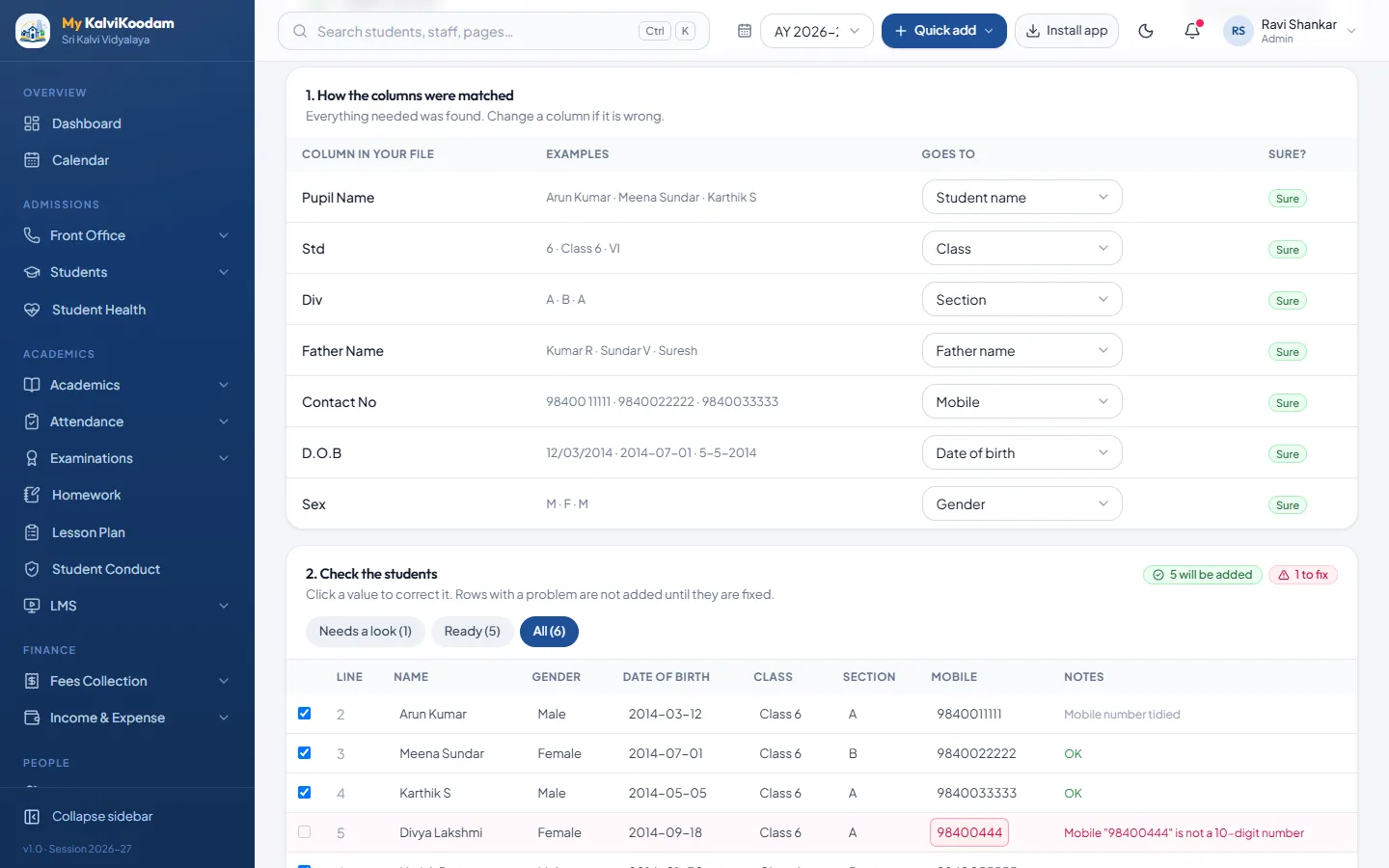
Upload the list the school already keeps. The columns are matched to the student record for you, class and section spellings and phone numbers are tidied, and every row with a problem is shown for you to fix before anything is saved. The file is read in the browser, and only the rows you confirm are sent to the school's own server.
- Reads Excel (.xlsx), CSV, Word (.docx) and PDF tables, and a phone photo of a printed or neatly written list
- Matches columns by their meaning, in any order and with any heading, with a Sure / Probably / Check mark on each match
- Tidies phone numbers, dates of birth and class and section spellings, and tells you what it assumed
- Shows the rows that need a look first: a missing name, a mobile number that is not 10 digits, a repeated student
- A list with no gender column: set boys or girls for everyone at once, or choose row by row
- Names the school does not have (a class written "VI") are mapped once and fixed in every row that uses them
- Photos: every word the reader was unsure of is marked, and you must tick that you checked the rows against the picture
- Nothing is saved until the final button, and only school leaders can add the students
- Download a sample file, and download the rows the server rejected
Connected
Works with the rest
- Students: the students are added to the directory with their class and section
- AI Assistant: attach a list or a photo in the chat and it opens the review screen for you
- Needs Students, which is added with it.
People
Who uses it
Each role sees what it needs, and nothing it should not.
Questions
Common questions about AI Import
How much does AI Import cost?
AI Import is ₹10 per active student per year, before GST. A bigger school pays less per student because of the size discount, and there is a minimum yearly fee per school. Choose it in the price calculator to see the exact amount for your school.
Can we use AI Import without the other modules?
AI Import needs Students, which is added with it. Everything else is optional: you can switch on only the modules you need.
Who uses AI Import?
Principal, Vice Principal, Receptionist, Managing Director, School Director, Correspondent use it, each seeing what their role needs.
How does AI Import work with the rest of the system?
Students: the students are added to the directory with their class and section. AI Assistant: attach a list or a photo in the chat and it opens the review screen for you.
Can we try AI Import before we buy?
Yes. The live demo has every module with a sample school, and we can walk you through AI Import on a call with your own numbers.